
Sep 4, 2026News Center
Fortinet Firewall Licensing Explained: FortiCare, FortiGuard, ATP, UTP & Enterprise Protection
Learn how Fortinet firewall licensing works, including FortiCare, FortiGuard, ATP, UTP, Enterprise Protection, renewals, and license selection.
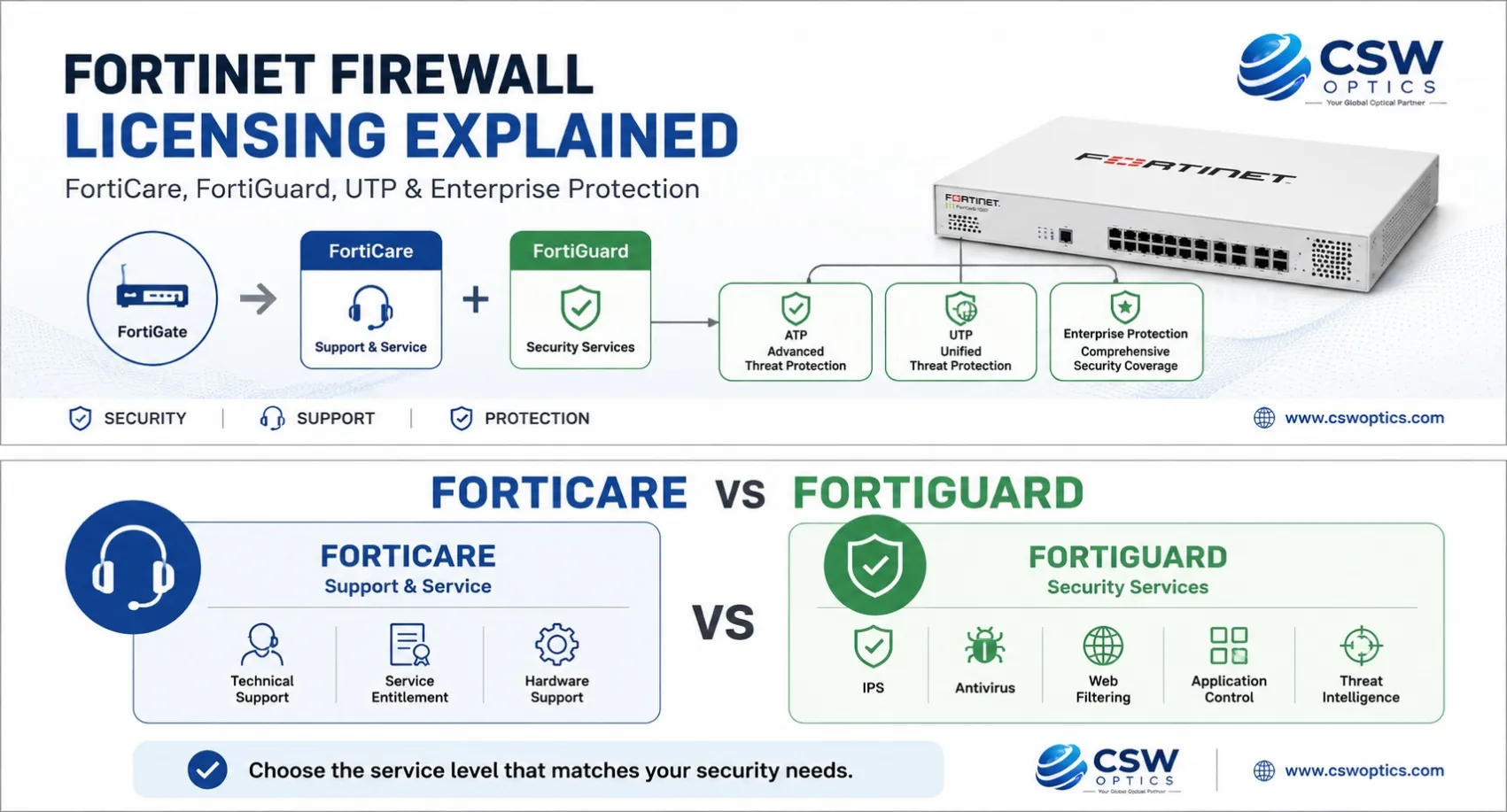
Fortinet Firewall Licensing: The Quick Answer
Buying a FortiGate firewall is only one part of building a secure network. The next question is often:
Which Fortinet license or security subscription do I need?
The terminology can be confusing because Fortinet offers FortiCare, FortiGuard, ATP, UTP, Enterprise Protection, FortiGate Cloud, FortiFlex, and individual security services.
The simplest way to understand them is:
- FortiGate → Firewall hardware or platform
- FortiCare → Technical support and service
- FortiGuard → Security services and threat intelligence
- ATP → Core threat protection
- UTP → ATP plus broader web and network protection
- Enterprise Protection → ATP + UTP plus broader enterprise security capabilities
FortiGate hardware appliances are not licensed according to the number of users or bandwidth tiers for standard firewall operation. Hardware specifications determine firewall performance, while FortiCare and FortiGuard provide support and security services.
If you already know your FortiGate model and security requirements, you may not need to read the entire guide. The sections below explain how to choose the appropriate service.
Which Fortinet License Do You Need?
A quick way to narrow down your requirements:
Need technical support?
→ FortiCare
Need core security protection such as IPS and antivirus?
→ ATP
Need core protection plus web and DNS security?
→ UTP
Need broader protection including DLP, IoT security, attack surface security, and AI-based inline malware prevention?
→ Enterprise Protection
Need flexible, usage-based licensing across hybrid or cloud environments?
→ FortiFlex
Fortinet also allows certain FortiGuard services to be purchased individually rather than only through a bundle.
FortiCare vs FortiGuard: What Is the Difference?
This is one of the most common questions when purchasing or renewing a FortiGate subscription.
FortiCare = Support
FortiCare is focused on technical support and service entitlements.
Depending on the service level, FortiCare can support areas such as:
- Technical support
- Hardware support
- Firmware and software support
- Service entitlements
- RMA-related services
For a production firewall, maintaining an appropriate support service can be important when technical assistance or hardware replacement is required.
FortiGuard = Security Services
FortiGuard provides security services and threat intelligence used by FortiGate.
Depending on the selected service or bundle, FortiGuard can provide capabilities including:
- Intrusion Prevention System (IPS)
- Antivirus
- Application Control
- Web filtering
- DNS filtering
- Anti-botnet and C2 protection
- Advanced malware protection
- Data Loss Prevention
- IoT security
- Other security intelligence services
Fortinet currently offers these capabilities individually and through several FortiGuard bundles.
In simple terms:
FortiCare helps support the firewall. FortiGuard helps protect the network.
FortiGuard ATP vs UTP vs Enterprise Protection
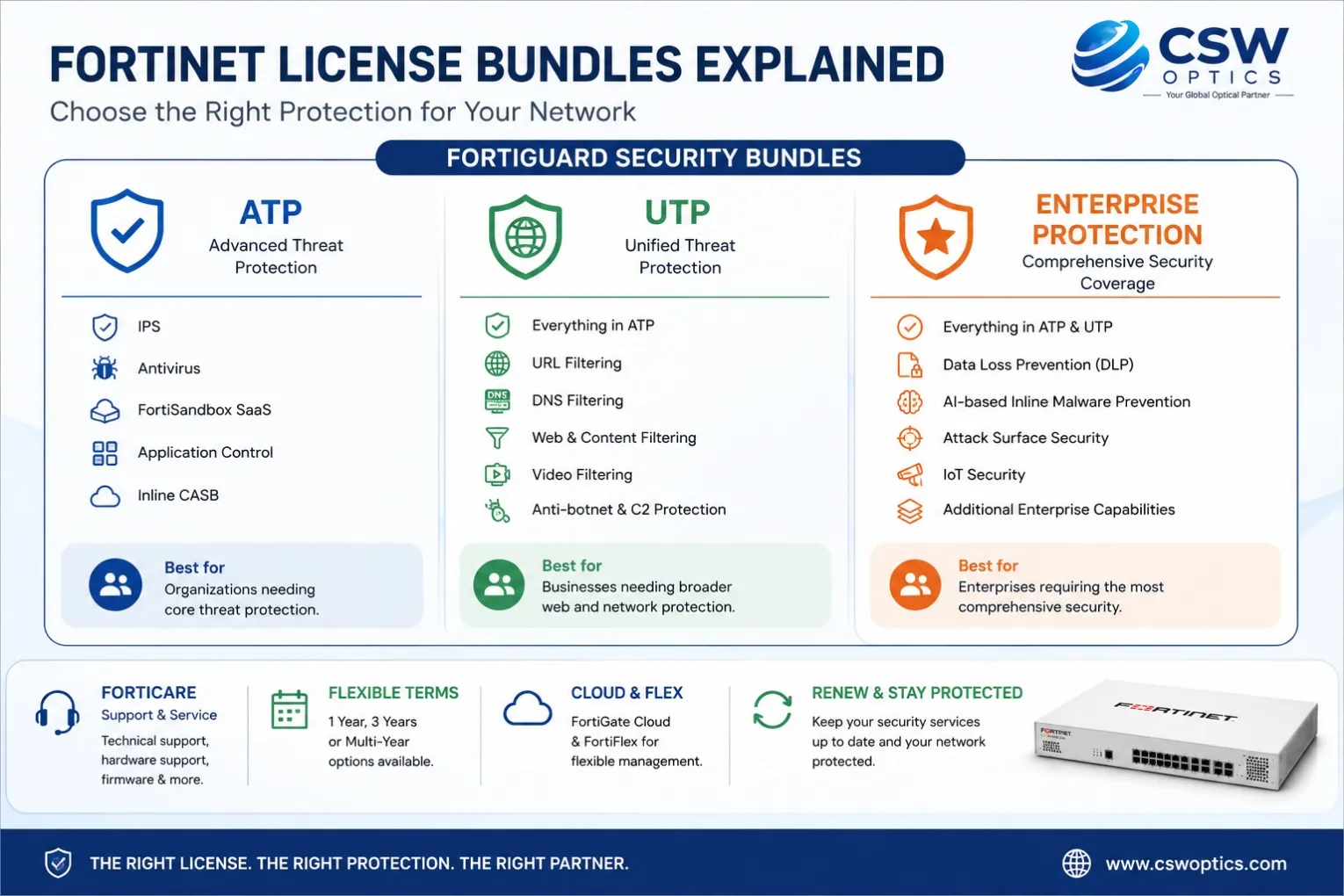
Fortinet's current FortiGuard bundle structure is designed to build security capabilities progressively.
1. ATP — Advanced Threat Protection
ATP provides a core layer of network and file security.
Current Fortinet information lists services such as:
- IPS
- Antivirus
- FortiSandbox SaaS
- Application Control
- Inline CASB
ATP is suitable for organizations looking for essential threat protection without the broader web and enterprise security capabilities included in higher-level bundles.
Best for:
Organizations that primarily need core network and malware protection.
2. UTP — Unified Threat Protection
UTP builds on ATP and adds broader web and network protection.
Current Fortinet information includes:
- Everything in ATP
- URL filtering
- DNS filtering
- Video filtering
- Anti-botnet and C2 protection
This makes UTP a practical choice for organizations that need stronger protection against web-based threats in addition to core network security.
Best for:
Businesses that need both core threat protection and broader web security.
3. Enterprise Protection
Enterprise Protection, also referred to by Fortinet as the ENT bundle, provides the broadest protection among these three bundles.
It includes ATP and UTP capabilities plus additional services such as:
- Data Loss Prevention (DLP)
- AI-based inline malware prevention
- Attack Surface Security
- IoT detection and vulnerability correlation
- Additional enterprise security capabilities
Fortinet notes that OT-specific device and protocol recognition is not included in the ENT bundle and can instead be purchased through the OT Security Service.
Best for:
Enterprises that need broader protection across networks, web, applications, data, SaaS, and devices.
Fortinet License Comparison in Simple Terms
Instead of looking at a complicated feature list, think about the bundles this way:
ATP
Core network and file protection
↓
IPS + Antivirus + Sandbox + Application Control
UTP
ATP
+
Web and DNS protection
+
Anti-botnet/C2 protection
Enterprise Protection
ATP
+
UTP
+
DLP
+
AI-based inline malware prevention
+
Attack Surface Security
+
IoT security
This progressive structure makes it easier to match the license with the actual security requirements of the organization.
Does a FortiGate Firewall Require a License?
This is another common misconception.
A physical FortiGate appliance is not normally licensed based on:
- Number of users
- Internet bandwidth
- Firewall throughput tiers
Instead, the hardware model determines its technical performance and capacity.
For example, organizations may select different FortiGate models such as:
- FortiGate 40F
- FortiGate 60F
- FortiGate 70G
- FortiGate 90G
- FortiGate 100F
- FortiGate 200F
The exact performance, interfaces, session capacity, and other specifications depend on the individual model.
Security subscriptions are a separate consideration.
Therefore:
FortiGate model ≠ FortiGuard subscription
You should select the hardware according to network performance requirements and select the security subscription according to protection requirements.
How to Choose the Right Fortinet License
Before requesting a quotation, answer these five questions.
1. What FortiGate model do you have?
For example:
FortiGate 60F or FortiGate 100F
The exact model is important when checking available services and subscription options.
2. Is this a new purchase or renewal?
A new FortiGate deployment and an existing firewall renewal may require different quotation information.
3. What security services do you need?
Determine whether you need:
- Core threat protection
- Web filtering
- DNS filtering
- Application control
- Advanced malware protection
- DLP
- IoT security
- Attack Surface Security
4. How long do you need the subscription?
Depending on the offer and deployment requirements, customers may consider:
- 1-year subscription
- 3-year subscription
- Multi-year options
5. How many firewalls are being deployed?
For multi-site or enterprise deployments, the number of FortiGate appliances can significantly affect how licensing should be managed.
Fortinet Firewall Licensing by Application Scenario
Small Business
A small business may have one FortiGate appliance protecting office users and Internet access.
Typical requirements include:
- Firewall protection
- IPS
- Antivirus
- Application control
- Web security
- Technical support
The goal is usually to balance security coverage with overall licensing cost.
Medium-Sized Enterprise
A medium-sized company may have:
- Multiple VLANs
- Several Internet connections
- VPN
- SD-WAN
- Multiple offices
- More advanced web security requirements
In this environment, UTP may be worth considering when broader web and network protection is required.
Enterprise Network
Large organizations may require:
- Advanced threat protection
- Web and DNS security
- DLP
- IoT visibility
- Attack Surface Security
- Centralized management
- Higher-level support
For these environments, Enterprise Protection may be more appropriate depending on the organization's security architecture.
Multi-Branch or Hybrid Cloud Deployment
Large organizations may also need flexible licensing across multiple environments.
Fortinet's FortiFlex is a usage-based, points-based licensing program designed to provide more flexibility for supported Fortinet solutions across on-premises, virtual, cloud, and hybrid environments. Organizations can scale deployments and services according to changing requirements.
This can be useful for organizations with:
- Multiple FortiGate deployments
- Hybrid cloud environments
- Variable capacity requirements
- Rapidly changing infrastructure
- Large security estates
Fortinet License Renewal: What Should You Check?
Renewing a Fortinet subscription should not simply mean purchasing the same service again.
Before renewal, check:
FortiGate model
Is the current firewall still appropriate for your network?
Current subscription
Which FortiGuard bundle or individual services are currently active?
Expiration date
When does the existing entitlement expire?
New security requirements
Does your organization now require DLP, IoT security, web filtering, or other services?
Support requirements
Does the current FortiCare level meet your production support requirements?
A renewal is a good opportunity to review both the firewall hardware and security services rather than treating licensing as an automatic annual purchase.
What Happens When a FortiGuard License Expires?
A FortiGate appliance does not simply stop functioning as a basic firewall because a FortiGuard subscription expires.
However, subscription-based security services and updates are affected by the applicable entitlement.
Depending on the service, this can include security intelligence such as:
- IPS updates
- Antivirus definitions
- Web filtering ratings
- Application control signatures
- Other FortiGuard security services
FortiCare support entitlements are also tied to the applicable service contract.
For production environments, keeping required security subscriptions current helps maintain the intended security posture.
What Information Should You Provide for a Fortinet License Quote?
If you are requesting a Fortinet firewall license quotation, providing the right information can make the process much faster.
We recommend providing:
- FortiGate model
- Serial number, when applicable
- New purchase or renewal
- Required FortiGuard bundle or services
- Subscription term
- Quantity
- Deployment scenario
For example:
FortiGate 100F, renewal, UTP, 1 year, 5 units.
This gives a supplier a much clearer starting point for preparing a quotation.
If you are not sure which service you need, simply provide the FortiGate model and explain your application requirements.
Fortinet Firewall Licensing FAQ
Does FortiGate require a license to work?
A physical FortiGate appliance can perform standard firewall functions without user-count or throughput-based licensing. However, many FortiGuard security services and FortiCare support services require active subscriptions.
What is the difference between FortiCare and FortiGuard?
FortiCare focuses on support and service, while FortiGuard provides security services and threat intelligence.
What is FortiGate ATP?
ATP stands for Advanced Threat Protection. It provides core security services such as IPS, antivirus, FortiSandbox SaaS, and Application Control.
What is FortiGate UTP?
UTP stands for Unified Threat Protection. It includes ATP capabilities and adds services such as URL filtering, DNS filtering, video filtering, and anti-botnet/C2 protection.
What is Enterprise Protection?
Enterprise Protection is Fortinet's broader FortiGuard security bundle. It includes ATP and UTP capabilities plus services such as DLP, AI-based inline malware prevention, Attack Surface Security, and IoT detection and vulnerability correlation.
Does Fortinet licensing depend on the number of users?
For physical FortiGate appliances, standard firewall operation is not licensed by the number of end users or bandwidth/throughput tiers. The hardware model determines the appliance's performance.
Can I renew the license without replacing my FortiGate?
In many cases, an existing FortiGate can continue to use renewed support and security subscriptions. The exact options depend on the model and applicable service entitlement.
Which Fortinet license is best?
There is no universal answer. ATP, UTP, and Enterprise Protection provide different levels of security coverage, so the correct choice depends on your network, applications, security requirements, and budget.
Final Thoughts
Fortinet firewall licensing becomes much easier to understand when you separate hardware, support, and security services.
Remember the basic structure:
FortiGate → Firewall platform
FortiCare → Support & service
FortiGuard → Security services
ATP → Core threat protection
UTP → ATP + broader web/network protection
Enterprise Protection → ATP + UTP + broader enterprise security
For a small office, a basic security bundle may be enough. For a larger enterprise, broader security capabilities may justify a higher-level FortiGuard bundle.
The best choice is not necessarily the most expensive license. It is the one that matches your actual security requirements.
Need Help Choosing a Fortinet Firewall License?
CSW Optics provides Original Equipment, Brand-Specific Solutions, Brand-Compatible Optical Transceivers, Network Infrastructure, and Security Solutions.
If you are purchasing or renewing a FortiGate 40F, 60F, 70G, 90G, 100F, 200F, or another Fortinet firewall, send us your model, quantity, subscription requirement, and deployment scenario.
Not sure which Fortinet license you need? Contact CSW Optics. We can help you identify the appropriate Fortinet solution before quotation.
Related Articles
1. How to Choose Fortinet Firewall
Learn how to select the right FortiGate firewall based on network size, throughput, security requirements, interfaces, and deployment scenario.
2. Fortinet Compatible Transceivers Explained
Understand how compatible optical transceivers can support Fortinet network connectivity and what to check before deployment.
3. Network Infrastructure for Enterprises
Explore how firewalls, switches, optical transceivers, fiber connectivity, and other network components work together in an enterprise environment.
4. How to Choose a Reliable Optical Transceiver Supplier
Discover the key factors to evaluate when sourcing compatible optical transceivers, including compatibility, testing, quality control, warranty, and technical support.
5. Why Optical Module Link Keeps Flapping
Learn how to troubleshoot unstable optical links and identify common causes involving transceivers, fiber connections, switch ports, and network equipment.