
Jun 26, 2026News Center
How to Choose the Right Fortinet Firewall for Your Business
Learn how to choose the right Fortinet firewall based on users, bandwidth, VPN, SSL inspection, scalability, and enterprise security requirements.
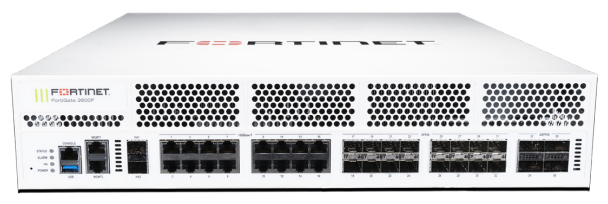
A Practical Guide for SMBs, Enterprises, ISPs, and Data Centers
Choosing a firewall today is no longer just about “blocking attacks.”
Modern networks carry cloud applications, remote users, video traffic, VPN tunnels, IoT devices, and hybrid workloads all at the same time.
That’s why many companies choose Fortinet firewalls — because they combine security, performance, SD-WAN, VPN, and centralized management into one platform.
But here’s the challenge:
Many buyers look only at the model number or price.
In reality, choosing the wrong firewall can lead to:
- Network bottlenecks
- VPN instability
- Slow applications
- Future upgrade costs
- Unsupported traffic growth
- Security gaps
- License overspending
This guide explains how to choose the right Fortinet firewall based on your real environment — not just marketing specifications.
Why Businesses Choose Fortinet Firewalls
Fortinet Is More Than Just a Firewall
A Fortinet solution usually includes:
- Next-Generation Firewall (NGFW)
- SD-WAN
- IPS / Anti-Malware
- SSL Inspection
- VPN Gateway
- Web Filtering
- Application Control
- Zero Trust Access
- Centralized Security Management
This makes Fortinet popular among:
- Small businesses
- Enterprise branches
- Schools
- Healthcare organizations
- Retail chains
- Data centers
- MSPs
- ISPs
Step 1 — Understand Your Actual Network Environment
Before selecting a firewall model, answer these questions first.
1. How Many Users Do You Have?
This is the most common mistake buyers make.
A firewall for 20 users and a firewall for 500 users are completely different products.
Small Office
Typical environment:
- 5–30 users
- Internet access
- VPN
- Basic security
Common models:
- FortiGate 40F
- FortiGate 60F
- FortiGate 70F
Medium Business
Typical environment:
- 50–200 users
- Multiple VLANs
- VoIP
- Cloud applications
- Site-to-site VPN
Common models:
- FortiGate 100F
- FortiGate 200F
Enterprise / Campus
Typical environment:
- Hundreds or thousands of users
- Heavy east-west traffic
- High SSL usage
- Redundant WAN links
Common models:
- FortiGate 400F
- FortiGate 600F
- FortiGate 1800F
Step 2 — Calculate Your Real Bandwidth Requirement
Many people buy based only on “Firewall Throughput.”
That can be misleading.
Important Throughput Types
Firewall Throughput
Raw Layer 3/4 traffic performance.
Usually the highest number in datasheets.
NGFW Throughput
Performance with security services enabled.
This matters far more in real deployments.
Threat Protection Throughput
Performance when IPS, antivirus, and application inspection are active.
This is often dramatically lower than raw throughput.
Example
A firewall advertised as:
- 20 Gbps firewall throughput
may deliver only:
- 2–4 Gbps with full security inspection enabled
That’s why understanding traffic behavior matters more than marketing numbers.
Step 3 — Consider SSL Inspection Requirements
Modern traffic is heavily encrypted.
Applications like:
- Microsoft 365
- Google Workspace
- Zoom
- Salesforce
- Dropbox
- Teams
mostly use HTTPS encryption.
Without SSL inspection, many threats can bypass traditional security policies.
Why This Matters
SSL inspection is extremely CPU-intensive.
If your company heavily relies on encrypted applications, you may need a larger model than expected.
This is one of the biggest reasons companies outgrow entry-level firewalls quickly.
Step 4 — Think About VPN Usage
Remote Work Changed Firewall Sizing
If your employees use:
- SSL VPN
- IPsec VPN
- Hybrid work
- Remote branches
then VPN performance becomes critical.
Questions to consider:
- How many concurrent VPN users?
- Will remote workers transfer large files?
- Do you use VoIP over VPN?
- Do you need always-on tunnels?
Step 5 — Choose Between Entry-Level, Mid-Range, and High-End Models
Entry-Level FortiGate
Best for:
- Small offices
- Retail stores
- Clinics
- Small warehouses
Advantages:
- Low cost
- Easy deployment
- Compact size
- Energy efficient
Limitations:
- Lower SSL performance
- Limited future scalability
Mid-Range FortiGate
Best for:
- Growing businesses
- Branch offices
- Multi-site organizations
Advantages:
- Better SD-WAN
- Higher VPN capacity
- Stronger NGFW performance
- Better scalability
Often the best balance between cost and long-term value.
High-End FortiGate
Best for:
- Data centers
- Enterprises
- ISPs
- High-density environments
Advantages:
- Massive throughput
- Advanced redundancy
- High session capacity
- Better HA performance
- Large-scale segmentation
Step 6 — Understand Licensing Before Buying
A common buyer mistake:
Purchasing hardware without understanding subscriptions.
Fortinet Licenses May Include
- FortiCare Support
- FortiGuard Security Services
- IPS
- AntiVirus
- Web Filtering
- Application Control
- Sandbox Services
- SD-WAN Features
Different bundles affect both security capabilities and total cost.
Step 7 — Think About Future Expansion
A firewall should not only fit today’s requirements.
It should also support:
- More users
- Faster internet
- Cloud migration
- Additional branches
- More VPN tunnels
- Higher SSL traffic
- New applications
Many companies replace firewalls too early because they sized only for current traffic.
Common Buyer Mistakes
Buying Based Only on Price
Cheap hardware can become expensive if:
- Performance becomes insufficient
- Downtime increases
- Upgrades are required too soon
Ignoring SSL Traffic
Modern encrypted traffic changes everything.
A firewall that works today may struggle after enabling full inspection.
Not Considering HA Deployment
High Availability (HA) is essential for many businesses.
If uptime matters, always evaluate:
- Active-passive deployment
- Redundant power
- Failover capability
- Session synchronization
Choosing Based Only on Port Count
More ports do not always mean better performance.
Traffic processing capability matters far more.
Which Fortinet Firewall Is Right for You?
Recommended Starting Point
Business Size | Recommended Series |
|---|---|
Small Office | FortiGate 40F / 60F |
SMB | FortiGate 80F / 100F |
Mid-Size Enterprise | FortiGate 200F / 400F |
Large Enterprise | FortiGate 600F+ |
Data Center / ISP | FortiGate 1800F+ |
Actual sizing depends on:
- Security policies
- SSL inspection
- VPN usage
- Traffic patterns
- Future expansion
Questions You Should Ask Before Ordering
A good supplier should help answer:
- What is your real NGFW throughput requirement?
- Will SSL inspection be enabled?
- How many VPN users do you expect?
- Do you need HA deployment?
- Which licenses are required?
- Will the firewall connect to switches or servers at 10G/25G/100G?
- Do you need compatibility with existing network equipment?
- What is the expected growth in the next 2–3 years?
If a supplier only asks for the model number, they may not fully understand your deployment needs.
Original vs Compatible Network Solutions
Many enterprises combine:
- Original firewalls
- Compatible optical transceivers
- DAC/AOC cables
- Third-party networking accessories
to reduce deployment cost while maintaining performance.
This is especially common in:
- Data centers
- Enterprise networks
- Cloud infrastructure
- ISP deployments
The key is ensuring compatibility, testing consistency, and long-term reliability.
Final Thoughts
Choosing a Fortinet firewall is not simply about buying the “biggest” model.
The right solution depends on:
- Real traffic patterns
- Security requirements
- VPN usage
- SSL inspection
- Scalability
- Future business growth
A properly selected firewall improves:
- Network stability
- Security visibility
- Application performance
- Long-term operational efficiency
while reducing unexpected upgrade costs later.
FAQ — How to Choose Fortinet Firewall
Is a larger firewall always better?
Not necessarily. Oversizing can increase cost unnecessarily, while undersizing causes performance problems. Proper sizing matters most.
What is the difference between firewall throughput and NGFW throughput?
Firewall throughput measures basic traffic forwarding. NGFW throughput reflects real-world performance with security inspection enabled.
Do I really need SSL inspection?
For many modern environments, yes. Most internet traffic is encrypted today, and threats can hide inside HTTPS sessions.
Should I choose hardware only or bundled licenses?
That depends on your security requirements. Many advanced protections require FortiGuard subscriptions.
Can Fortinet firewalls support SD-WAN?
Yes. Many FortiGate models include integrated SD-WAN functionality.
Need Help Choosing the Right Fortinet Solution?
Whether you need:
- Original Fortinet hardware
- Compatible optical transceivers
- High-speed DAC/AOC cables
- Enterprise networking solutions
our team can help recommend solutions based on your real deployment requirements.
Related Solutions
- Fortinet Firewall Solutions
- Cisco Enterprise Networking
- Optical Transceivers
- DAC & AOC Cables
- 10G / 25G / 100G / 400G Connectivity Solutions
Fortinet firewall, FortiGate firewall, how to choose Fortinet firewall, Fortinet sizing guide, FortiGate NGFW, enterprise firewall solutions, Fortinet VPN firewall, Fortinet SD-WAN, Fortinet firewall for business, FortiGate firewall comparison