
BiDi Transceivers: How to Choose Single-Fiber Optics — and When Not To
BiDi transceivers send and receive over a single fiber using two wavelengths. Learn how BX, SR-BD and SRBD modules work, and the pairing mistakes that leave a link dark.
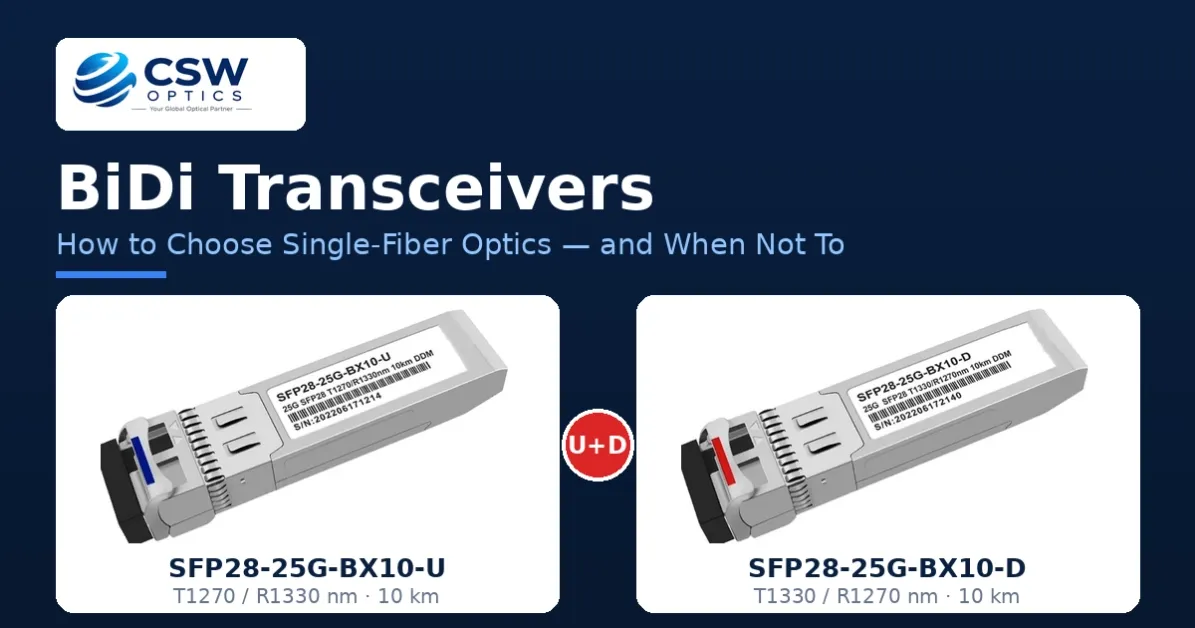
Most fiber upgrades start with a speed question: 10G, 25G, 100G, 400G. BiDi upgrades start with a different question: how many fibers do you actually have left? If a building riser, a campus duct, or a leased dark-fiber circuit leaves you with one strand instead of two, the question is no longer "how fast?" — it is "can this link work at all without pulling new cable?" That is the whole job of a BiDi transceiver: it sends and receives over a single fiber, so one strand does the work of two.
Here is the catch, and it is the one that catches buyers out: a BiDi module on its own is useless. BiDi modules only work as a matched pair, and a pair bought with the wrong wavelengths is two expensive paperweights. This guide explains how BiDi works in plain terms, which BiDi modules CSW Optics stocks, when single-fiber optics is the right call, and the field mistakes that leave a BiDi link dark.
How BiDi Works: Two Colours of Light, One Fiber, One Pair
A normal duplex transceiver uses two fibers — one to send, one to receive — and both directions use the same wavelength (colour) of light. A BiDi transceiver uses one fiber and two colours: it sends on one wavelength and listens on another, and the module at the far end does the exact opposite. Think of it as two people talking on one phone line in different pitches of voice: each side talks in its own pitch and only listens for the other one, so both directions share the strand without colliding. The technical name for this is wavelength-division multiplexing (WDM), and a small filter inside the module — a diplexer — is what keeps the two colours apart.
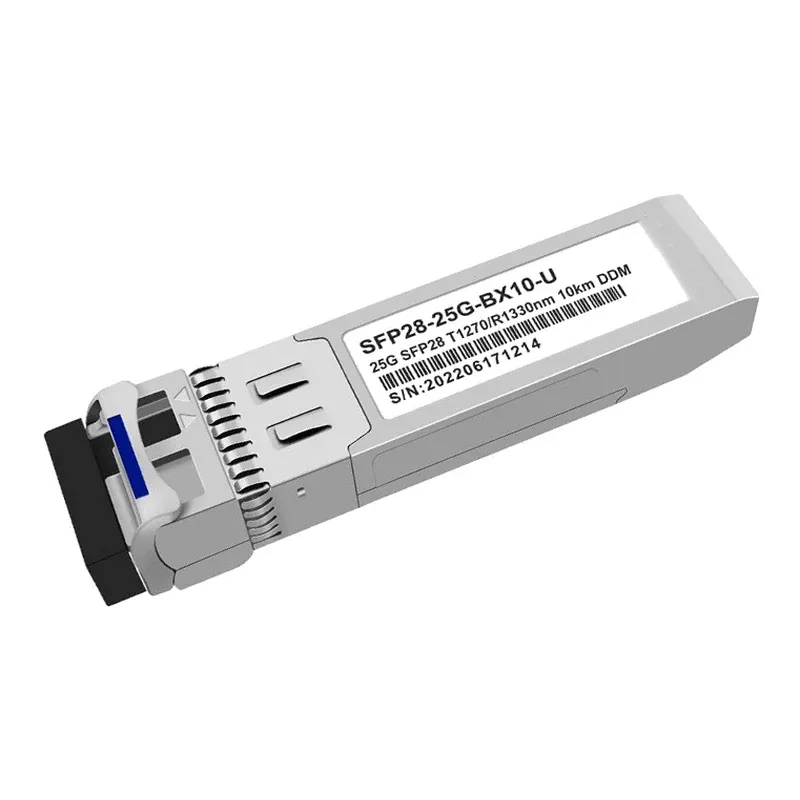
That is why BiDi modules always come in pairs, and why the pair matters more than the single module. In the BX family the two ends are called U (upstream) and D (downstream). The U end sends on 1270 nm and listens on 1330 nm; the D end sends on 1330 nm and listens on 1270 nm. Put two U modules face to face and nothing happens — both are talking on the same colour and neither is listening for it. The same rule holds at every speed: 1G BX, 25G BX, 100G B20, 40G SR-BD, 400G SRBD. The pair is the product, even though you order it as two line items.
One warning from the field, because it burns people regularly: the letters are not standardised. U/D, A/B, "upstream/downstream" — every vendor labels the two ends its own way, and one maker's "A" is not guaranteed to be another maker's "A". The only thing that never lies is the TX/RX wavelength printed on the label. When you order, when you spare, and when you troubleshoot, match the numbers — TX at one end must equal RX at the other — not the letters.
The second thing to know: BiDi does not make a link faster. It makes a link possible where only one fiber exists. If you already have a healthy pair of fibers in the ground, a standard duplex module is cheaper, simpler to spare, and easier to replace. BiDi earns its place when the fiber itself is the problem: one strand left in a riser, a single dark fiber leased from a carrier, a campus duct with no room for another pull, or a building where re-cabling costs more than the optics.
The BiDi Family on CSW Optics: One Table, Six Decisions
BiDi is not one product. It spans 1G to 400G, single-mode and multi-mode, simplex LC and MPO-12. Table 1 gathers the BiDi modules currently on cswoptics.com, with the numbers taken from each product page. Read it as a map, not a shopping list — the right row depends on your fiber type, your distance, and your connector, in that order.
Table 1. BiDi modules on CSW Optics — rate, wavelengths, fiber, reach, connector
| Module | Rate | Wavelengths (TX / RX) | Fiber | Reach | Connector |
|---|---|---|---|---|---|
| GLC-BX-U / BX-D (compatible, 1G) | 1G | 1310 / 1550 nm (U/D pair) | SMF, single strand | 20 km | LC simplex |
| SFP-10/25G-BXU-I / BXD-I (compatible) | 10G / 25G dual-rate | 1270 / 1330 nm (U/D pair) | SMF, single strand | 10 km | LC simplex |
| Huawei SFP-25G-BX (compatible) | 25G | 1270 / 1330 nm | SMF, single strand | 10 km | LC simplex |
| QSFP-40G-SR-BD (original) | 40G | 850 / 900 nm | MMF | 100 m (OM3) / 150 m (OM4) | LC duplex |
| QSFP-40/100G-SRBD (original) | 40G / 100G dual-rate | 855 / 908 nm | MMF | 70 m (OM3) / 100 m (OM4) | LC duplex |
| QSFP-100G-B20U4 / B20D4 (compatible) | 100G | U/D pair (see product page) | SMF, single strand | 20 km | LC simplex |
| QDD-400G-SRBD / OSFP-400G-SRBD (Arista compatible) | 400G | 855 / 908 nm | MMF | 70 m (OM3) / 100 m (OM4) | MTP/MPO-12 (UPC) |
Three patterns in that table are where buyers most often go wrong.
First, the single-mode rows and the multi-mode rows solve different problems. The BX rows (1270/1330 nm, or 1310/1550 nm at 1G) are the long-distance answer: single-mode fiber, one strand, kilometres of reach — built for campus and metro links where fiber is scarce. The SR-BD rows (850/900 nm or 855/908 nm) are the in-building answer: multi-mode fiber over tens of metres, built to reuse the LC duplex fiber already in your racks instead of pulling MPO trunks. They are not interchangeable — a BX module will not talk to an SR-BD module, and no coding change fixes that.
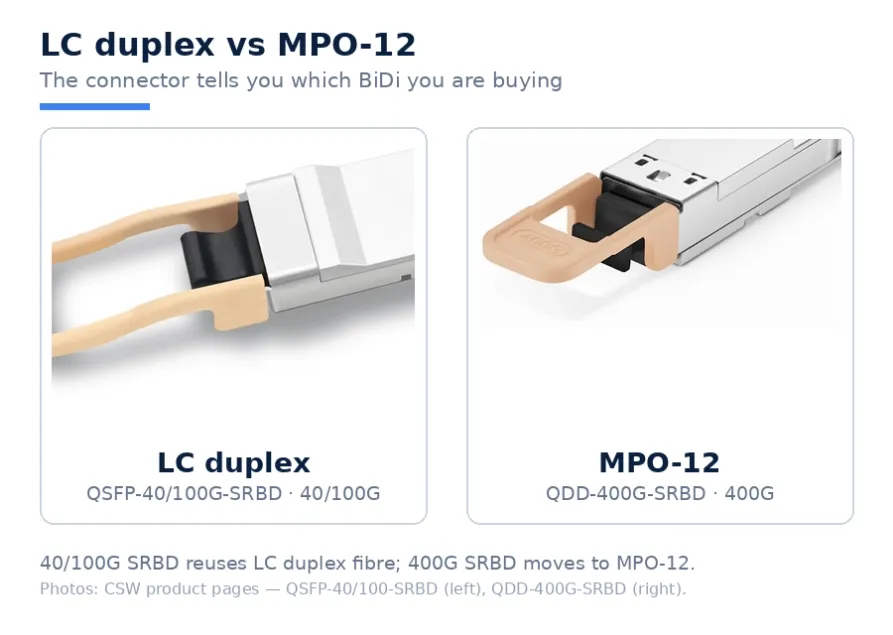
Second, the connector tells you which upgrade you are really doing. Every BiDi module up to 100G in Table 1 uses LC — simplex LC for the single-mode BX family, duplex LC for the multi-mode SR-BD family. Only the 400G SRBD modules use MPO-12. That is the point of 40G and 100G SR-BD: step up from 10G to 40G, or 40G to 100G, over the LC duplex fiber that is already installed, with no re-cabling. At 400G the trade changes — SRBD moves to MPO-12, and the choice becomes SRBD versus SR8, which we come back to below.
Third, temperature and FEC are part of the spec, not footnotes. The Cisco-compatible SFP-10/25G-BXU-I / BXD-I pair is industrial-rated at −40 to +85 °C; the Huawei SFP-25G-BX is commercial-rated at 0 to 70 °C — same wavelengths, same 10 km, very different places they can live. And at 25G, the BX pair only makes its full 10 km with RS-FEC switched on at the host; with BASE-R FEC only, you get about 3.5 km. If your switch cannot enable RS-FEC on that port, you do not own a 10 km module — you own a 3.5 km one. Check the host before you check the price.
BiDi vs Duplex: The Same Speed, a Different Bill
Table 2 is the whole decision in one view. Both columns run at the same speeds; what changes is what your fiber plant charges you.
Table 2. BiDi vs conventional duplex at the same speed
| BiDi (single fiber) | Duplex (two fibers) | |
|---|---|---|
| Fibers per link | 1 strand | 2 strands |
| How directions are separated | Two wavelengths (WDM) | Two fibers, one wavelength |
| When it wins | Only one strand available; leased dark fiber; re-cabling costs more than optics | Duplex fiber already installed; new build |
| What it costs | More per module; pair must match | Less per module; any matching pair works |
| Sparing | Must stock both ends (U and D) | One spare covers either end |
| Main failure mode | Wrong pair, wavelength mismatch, FEC not enabled | Dirty connector, wrong fiber type |
The cost row surprises people, so it is worth saying plainly. A BiDi link usually costs more in optics than the same link in duplex, because every BiDi module carries the WDM filter a duplex module does not need. The saving is never in the module. The saving is the fiber you do not have to pull, the duct you do not have to open, and the second dark-fiber lease you do not have to sign. If none of those apply, duplex is the better buy — for a new build with duplex fiber already in place, the honest answer is: do not buy BiDi.
The sparing row is the one that bites later, usually at 2 a.m. A duplex spare fits either end of a link. A BiDi spare does not: a spare U cannot replace a failed D. Sites that stock "one spare BiDi" discover this the hard way. Stock both ends, in equal numbers, in the same drawer — and label them, because U and D modules look identical and the pull-tab label is the only difference between a five-minute swap and a second outage.
Three Questions, Then Buy
Question 1: How many strands do you actually have? Count strands, not cables — "one cable" hides the strand count. Two good strands? Buy duplex. One strand, or one good strand plus one you cannot trust? BiDi is on the table. Leasing dark fiber? Read the contract: a single-strand lease is the classic BiDi case, and the lease saving usually dwarfs the extra cost of the optics.
Question 2: Single-mode or multi-mode — and how far? Single-mode and kilometres point to BX: the SFP-10/25G-BXU-I / BXD-I pair for Cisco-compatible 10/25G links, or the Huawei SFP-25G-BX for Huawei-compatible 25G links — both 10 km over a single strand. Multi-mode and tens of metres point to SR-BD: the original QSFP-40G-SR-BD or the dual-rate original QSFP-40/100G-SRBD, with the compatible QSFP-40G-SR-BD and compatible QSFP-40/100-SRBD as the coded alternatives. The dual-rate SRBD deserves a note: it runs at 40G or 100G over the same LC duplex fiber, so a 40G link can step up to 100G later without touching the fiber — but only if both ends are dual-rate.
Question 3: At 400G, SRBD or SR8? This is the one place BiDi stops being about scarce fiber. The Arista-compatible QDD-400G-SRBD and OSFP-400G-SRBD both run 400G over MPO-12 multi-mode fiber to 100 m (OM4). Against SR8, the trade is fiber count versus ecosystem: SRBD uses fewer fibers per link; SR8 is the more widely deployed 400G multi-mode option. Already running SR8? Stay SR8. Choose SRBD when the fiber count per link is your constraint, or when you are building a new 400G tier and can standardise on it from day one. Never mix the two on the same link. And watch the naming trap: QDD-400G-BD is a separate LC-connector model in the standard — it is not the MPO-12 QDD-400G-SRBD, and ordering one when you meant the other means ordering the wrong connector.
When the Link Stays Dark: A Five-Minute Field Check
Ask field engineers what actually kills BiDi links and the same stories come back. Before you condemn a module, run these five checks — in this order, because the cheap causes come first.
- Read the labels on both ends — out loud. The single most common BiDi failure is two of the same end: two U modules (or two D, or two "A") facing each other, often because both modules from one box were installed at the same site and the far site got the other pair's twins. Check the TX/RX numbers on both labels: TX here must be RX there. If the pair is wrong, no amount of reseating will help — swap one end.
- One direction works, the other does not? Suspect the path, not the module. On a duplex link you can swap the two fibers to isolate a fault; on a BiDi link both directions share one strand, but they travel on different wavelengths — and a dirty connector, a tight bend at the rack, a tired splice, or a patch panel in the route can punish one wavelength more than the other. Clean and inspect both end faces first. Experienced techs will tell you they have "fixed" more BiDi links with a cleaning pen than with a spare module.
- Power readings look fine but the link is down? Check FEC on both ends. A classic at 25G and 100G: the DOM numbers are healthy, both modules are recognised, and the link still will not come up — because the two hosts are set to different FEC modes. Both ends must agree (and for the 25G BX pair's full 10 km, that setting is RS-FEC). Module recognised, power normal, link dark: think settings before hardware.
- Brand-new link, very short, receiver overloaded? Long-reach modules on a short, clean run can shout too loudly: the received power lands above the receiver's maximum and the link errors or drops. This is the flip side of the usual "not enough power" problem, and it catches people who mix distance classes — a 20 km module at one end of a 200 m link, say. Check the receive power against the module's maximum, not just its minimum; an inline attenuator is the standard fix.
- Write it down while it works. When the link comes up, record both ends in your link sheet: part numbers, TX/RX wavelengths, slot, and the DOM transmit/receive readings at both ends on day one. A BiDi link has no symmetry to fall back on when you troubleshoot it later — those commissioning numbers are your baseline, and "what did it read when it worked?" is the first question you will ask during an outage. (Reading DOM numbers properly deserves its own guide — it is the subject of our next article. For now: check both directions, and never assume they should match.)
And one rule that prevents half of the above: order pairs as pairs. Write every BiDi order as 1 × U + 1 × D per link, line by line — never "2 × BiDi module" and hope the warehouse splits them. The pair that arrives split correctly is the pair that lights up on the first visit.
What to Order: The In-Stock Pairs
If the three questions above point to BiDi, order the pairs from Table 1 — as pairs, in one order, with your switch models named. For a 10 km single-mode hop, the SFP-10/25G-BXU-I with its BXD-I partner is the dual-rate, industrial-rated choice; the Huawei SFP-25G-BX is the 25G Huawei-compatible equivalent. For a 20 km 100G single-mode hop, the QSFP-100G-B20U4 / B20D4 pair runs the full distance on one strand. For an in-rack multi-mode upgrade, the QSFP-40G-SR-BD and QSFP-40/100G-SRBD originals — or their compatible counterparts, the QSFP-40G-SR-BD and QSFP-40/100-SRBD — reuse the LC duplex fiber you already own. And for 400G, the QDD-400G-SRBD and OSFP-400G-SRBD cover both form factors. (For the difference between single-mode and multi-mode fiber itself, see our Single-Mode vs Multi-Mode Fiber Explained guide.)
A Five-Step Checklist Before You Order
Table 3. The BiDi pre-order checklist
| Step | Check | If it fails |
|---|---|---|
| 1. Count the strands | How many usable strands, per link? | Two good strands → buy duplex instead |
| 2. Match the fiber | Single-mode or multi-mode? | Wrong family — re-select from Table 1 |
| 3. Match the distance | Kilometres (BX) or metres (SR-BD)? | Wrong reach — check the next distance option |
| 4. Pair and wavelength | U with D, wavelengths mirrored? | Link stays dark — swap one end |
| 5. Spares and coding | Both ends spared; modules coded for your switch? | Order the missing end now, not after the outage |
BiDi is a niche technology with an outsized payoff in exactly one situation: when the fiber you have is the fiber you must use. Count the strands first, match the fiber and the distance second, buy the pair — never a single — third, and the technology does the rest. And when you ask for a quote, include the switch model and the strand count alongside the module numbers: that is the information that determines whether the pair we code and test for you is the pair that lights up on arrival.
Planning a single-fiber upgrade?
Tell us your switch model, the strand count, and the distance — we will confirm the BiDi pair before you order.